728x90
반응형
결과화면


전체 아키텍쳐 요약
업비트 WebSocket
↓
FastAPI 중계
↓
React 실시간 분봉 생성
↓
이동평균 계산
↓
골든 / 데드 감지
↓
FastAPI 알림 API
↓
Telegram Bot
React 구조
CandleChart.js
import React, { useState, useEffect, useRef } from "react";
import Chart from "react-apexcharts";
import axios from "axios";
import MaCalc from "../utils/MaCalc";

function CandleChart() {

    const [candles, setCandles] = useState([]);

    const wsRef = useRef(null);

    const crossAlertRef = useRef({});

    const CROSS_PAIRS = [
        { short: 5, long: 10 },
        { short: 5, long: 20 },
        { short: 5, long: 60 },
        { short: 10, long: 20 },
        { short: 10, long: 60 },
        { short: 20, long: 60 },
    ];

    const loadInitialCandles = async () => {
        try {
            const res = await axios.get("http://localhost:8000/upbit/candle");


            const sorted = res.data.sort(
                (a, b) =>
                    new Date(a.candle_date_time_kst) -
                    new Date(b.candle_date_time_kst)
            );

            const formatted = sorted.map((item) => ({
                timestamp: new Date(item.candle_date_time_kst).getTime(), // ms
                open: item.opening_price,
                high: item.high_price,
                low: item.low_price,
                close: item.trade_price, // 종가
            }));

            setCandles(formatted);

        } catch (err) {
            console.log("초기 캔들 오류 :", err);
        }
    };

    const connectWs = () => {
        const ws = new WebSocket("ws://127.0.0.1:8000/chart");

        wsRef.current = ws;

        ws.onopen = () => console.log("WS 연결됨");

        ws.onmessage = (event) => {
            try {
                const t = JSON.parse(event.data);

                const price = t.trade_price;       // 체결가
                const ts = t.trade_timestamp;      // 체결 시간 (ms)

                setCandles((prev) => {
                    if (prev.length === 0) return prev;

                    const last = { ...prev[prev.length - 1] };
                    const list = [...prev];

                    const lastMin = Math.floor(last.timestamp / 60000);
                    const nowMin = Math.floor(ts / 60000);

                    if (nowMin !== lastMin) {
                        const newCandle = {
                            timestamp: ts,
                            open: price,
                            high: price,
                            low: price,
                            close: price,
                        };

                        const updated = [...list, newCandle];

                        const MAX_CANDLES = 100;

                        return updated.length > MAX_CANDLES
                            ? updated.slice(updated.length - MAX_CANDLES)
                            : updated;
                    }

                    last.high = Math.max(last.high, price);
                    last.low = Math.min(last.low, price);
                    last.close = price;

                    list[list.length - 1] = last;
                    return list;
                });

            } catch (err) {
                console.error("WS JSON 파싱 오류:", err);
            }
        };

        ws.onclose = () => {
            console.log("WS 끊김 → 2초 후 재연결");
            setTimeout(connectWs, 2000);
        };
    };

    useEffect(() => {
        loadInitialCandles(); // 과거 캔들 로딩
        connectWs();          // 실시간 WebSocket 연결

        return () => {
            if (wsRef.current) wsRef.current.close();
        };
    }, []);

    useEffect(() => {
        if (candles.length < 60) return;

        const prices = candles.map(c => ({ trade_price: c.close }));

        const maValues = {
            5: MaCalc(prices, 5),
            10: MaCalc(prices, 10),
            20: MaCalc(prices, 20),
            60: MaCalc(prices, 60),
        };

        CROSS_PAIRS.forEach(({ short, long }) => {
            const shortMa = maValues[short];
            const longMa = maValues[long];

            if (!shortMa || !longMa) return;

            const len = shortMa.length;
            if (len < 2) return;

            const prevShort = shortMa[len - 2];
            const prevLong = longMa[len - 2];
            const currShort = shortMa[len - 1];
            const currLong = longMa[len - 1];

            if (
                prevShort == null || prevLong == null ||
                currShort == null || currLong == null
            ) return;

            const keyGolden = `${short}-${long}-golden`;
            const keyDead = `${short}-${long}-dead`;

            /* 🔥 골든크로스 */
            if (prevShort < prevLong && currShort > currLong) {
                if (!crossAlertRef.current[keyGolden]) {
                    crossAlertRef.current[keyGolden] = true;
                    crossAlertRef.current[keyDead] = false;

                    console.log(`📈 MA${short} → MA${long} 골든크로스`);

                    axios.post("http://localhost:8000/alert/golden-cross", {
                        symbol: "KRW-BTC",
                        price: candles.at(-1).close,
                        short,
                        long,
                        short_ma: currShort,
                        long_ma: currLong,
                    });

                }
            }

            /* ❄️ 데드크로스 */
            if (prevShort > prevLong && currShort < currLong) {
                if (!crossAlertRef.current[keyDead]) {
                    crossAlertRef.current[keyDead] = true;
                    crossAlertRef.current[keyGolden] = false;

                    console.log(`📉 MA${short} → MA${long} 데드크로스`);

                    axios.post("http://localhost:8000/alert/dead-cross", {
                        symbol: "KRW-BTC",
                        price: candles.at(-1).close,
                        short,
                        long,
                        short_ma: currShort,
                        long_ma: currLong,
                    });

                }
            }
        });

    }, [candles]);

    const seriesData = candles.map((item) => ({
        x: new Date(item.timestamp),                // 시간
        y: [item.open, item.high, item.low, item.close], // OHLC
    }));

    const makeMaSeries = (maArray) => {
        if (!maArray || maArray.length === 0) return [];

        const result = [];

        const minLength = Math.min(maArray.length, seriesData.length);

        for (let i = 0; i < minLength; i++) {
            const ma = maArray[i];
            const candle = seriesData[i];

            if (ma == null || !candle) continue;

            result.push({
                x: candle.x,
                y: Number(ma), // 🔥 숫자 강제
            });
        }

        return result;
    };

    const pricesForChart = candles.map(c => ({ trade_price: c.close }));

    const ma5 = MaCalc(pricesForChart, 5);
    const ma10 = MaCalc(pricesForChart, 10);
    const ma20 = MaCalc(pricesForChart, 20);
    const ma60 = MaCalc(pricesForChart, 60);


    const series = [
        { name: "캔들", type: "candlestick", data: seriesData },
        { name: "MA5", type: "line", data: makeMaSeries(ma5) },
        { name: "MA10", type: "line", data: makeMaSeries(ma10) },
        { name: "MA20", type: "line", data: makeMaSeries(ma20) },
        { name: "MA60", type: "line", data: makeMaSeries(ma60) },
    ];

    const chartOptions = {
        chart: {
            type: "line",               // mixed chart 기본 타입
            height: 450,
            animations: { enabled: false }, // 실시간이므로 애니메이션 off
        },
        xaxis: { type: "datetime" },
        yaxis: { tooltip: { enabled: true } },
        stroke: {
            width: [1, 2, 2, 2, 2],     // 캔들 얇게, MA 두껍게
        },
    };

    return (
        <div>
            <h2>실시간 업비트 캔들 차트</h2>

            <Chart
                options={chartOptions}
                series={series}
                type="line"
                height={450}
            />
        </div>
    );
}

export default CandleChart;
1️⃣ React – CandleChart.jsx 전체 구조 설명
업비트 실시간 체결 데이터를 받아서 분봉 캔들을 만들고,
이동평균(MA) 교차를 감지해서 서버에 알림 요청을 보내며,
동시에 차트로 시각화한다
감지할 이동평균 조합
const CROSS_PAIRS = [
  { short: 5, long: 10 },
  { short: 5, long: 20 },
  { short: 5, long: 60 },
  { short: 10, long: 20 },
  { short: 10, long: 60 },
  { short: 20, long: 60 },
];
의미
- 모든 MA 조합을 동적으로 감지
- 나중에 120일선, 200일선 추가해도 구조 안 바뀜
2️⃣ 과거 캔들 로딩 (REST API)
const loadInitialCandles = async () => {- WebSocket은 실시간만 주므로, 차트를 그리기 위해 과거 캔들 선로딩
const res = await axios.get("http://localhost:8000/upbit/candle");- FastAPI가 업비트 REST API를 대신 호출해줌
const sorted = res.data.sort(...)- 시간 기준 오름차순 정렬
const formatted = sorted.map((item) => ({
  timestamp: new Date(item.candle_date_time_kst).getTime(),
  open: item.opening_price,
  high: item.high_price,
  low: item.low_price,
  close: item.trade_price,
}));
차트 + 계산에 쓰기 좋은 형태로 변환
setCandles(formatted);- candles state 세팅 -> 차트 자동 렌더
3️⃣ WebSocket 실시간 캔들 생성
const ws = new WebSocket("ws://127.0.0.1:8000/chart");- FastAPI가 업비트 WebSocket을 중계
ws.onmessage = (event) => {- 실시간 체결 데이터 수신
const price = t.trade_price;
const ts = t.trade_timestamp;
- 체결 가격, 체결 시간
🧠 분봉 캔들 생성 로직 (핵심)
const lastMin = Math.floor(last.timestamp / 60000);
const nowMin = Math.floor(ts / 60000);
- 현재 체결이 같은 분인지 / 새로운 분인지 판단
새 분 시작
if (nowMin !== lastMin) {
  // 새 캔들 생성
}
같은 분
last.high = Math.max(last.high, price);
last.low = Math.min(last.low, price);
last.close = price;
이 구조 덕분에 업비트 분봉 API 없이, 실시간 분봉 생성 가능
4️⃣ 최초 실행 useEffect
useEffect(() => {
        loadInitialCandles();
        connectWs();
컴포넌트 마운트 시 과거 캔들 로딩, WebSocket 연결
return () => {
  if (wsRef.current) wsRef.current.close();
};
컴포넌트 언마운트 시, WebSocket 정리 ( 메모리 누수 방지 )
5️⃣ 이동평균 교차 감지
useEffect(() => {
  if (candles.length < 60) return;
- MA60 계산을 위해 최소 60개가 필요.
const prices = candles.map(c => ({ trade_price: c.close }));- MaCalc 입력 형태에 맞춤
axios.post("http://localhost:8000/alert/golden-cross", {
  symbol: "KRW-BTC",
  price: candles.at(-1).close,
  short,
  long,
  short_ma: currShort,
  long_ma: currLong,
});
- 서버로 알림 전송
6️⃣ 차트 데이터 변환
캔들 데이터
const seriesData = candles.map(item => ({
  x: new Date(item.timestamp),
  y: [item.open, item.high, item.low, item.close],
}));
이동평균 라인 데이터
makeMaSeries(maArray)- null 값 제거, candle과 길이 맞춤, ApexCharts 오류 방지
FastAPI
alert.py
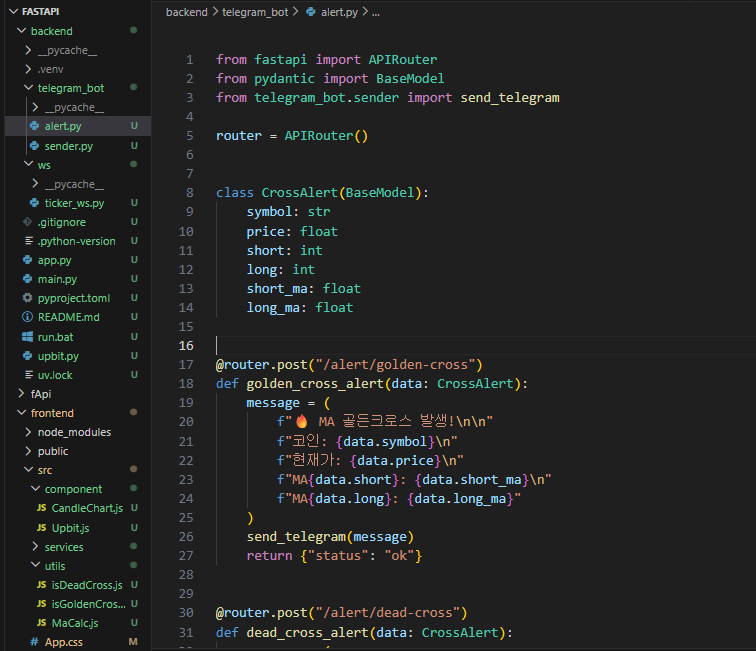
from fastapi import APIRouter
from pydantic import BaseModel
from telegram_bot.sender import send_telegram

router = APIRouter()


class CrossAlert(BaseModel):
    symbol: str
    price: float
    short: int
    long: int
    short_ma: float
    long_ma: float


@router.post("/alert/golden-cross")
def golden_cross_alert(data: CrossAlert):
    message = (
        f"🔥 MA 골든크로스 발생!\n\n"
        f"코인: {data.symbol}\n"
        f"현재가: {data.price}\n"
        f"MA{data.short}: {data.short_ma}\n"
        f"MA{data.long}: {data.long_ma}"
    )
    send_telegram(message)
    return {"status": "ok"}


@router.post("/alert/dead-cross")
def dead_cross_alert(data: CrossAlert):
    message = (
        f"💀 MA 데드크로스 발생!\n\n"
        f"코인: {data.symbol}\n"
        f"현재가: {data.price}\n"
        f"MA{data.short}: {data.short_ma}\n"
        f"MA{data.long}: {data.long_ma}"
    )
    send_telegram(message)
    return {"status": "ok"}
class CrossAlert(BaseModel):- 프론트에서 오는 JSON을 강제 검증, 하나라도 빠지면 422 에러
@router.post("/alert/golden-cross")

message = f"""
🔥 MA 골든크로스 발생!
...
"""

send_telegram(message)
- URL 자체가 이벤트 타입,
- MA조합이 무엇이든 동적으로 메시지 생성,
- 텔레그램 전송 책임을 sender로 분리
sender.py

# telegram_bot/sender.py
import requests

BOT_TOKEN = "~~~~~~~~~~~~~~~"
CHAT_IDS = [
    "~~~~~~~~",
    # "~~~~~~~~~~",
]


def send_telegram(message: str):
    url = f"https://api.telegram.org/bot{BOT_TOKEN}/sendMessage"

    for chat_id in CHAT_IDS:
        payload = {
            "chat_id": chat_id,
            "text": message,
        }
        requests.post(url, json=payload)
requests.post(url, json=payload)- Telegram Bot API 호출
728x90
반응형
'✨ python > FastAPI' 카테고리의 다른 글
| [FastAPI] asyncio 사용하여 볼린저밴드 차트 구현하기 (0) | 2026.01.06 |
|---|---|
| [FastAPI, Recat] 차트에 볼린저밴드 추가하기 (0) | 2026.01.04 |
| [FastAPI, React] Telegram Bot 연동하기 (0) | 2025.12.21 |
| [FastAPI, Recat] 이전 데이터 + 실시간 데이터(WebSocket) 합하기 (3) (0) | 2025.12.14 |
| [FastAPI, Recat] 이전 데이터 + 실시간 데이터(WebSocket) 합하기 (2) (0) | 2025.12.12 |
댓글