


CMD창에 실시간으로 찍히고 있는 웹소켓 데이터들
asyncio란 무엇인가?
- 하나의 프로그램이 여러 작업을 동시에 처리하는 방식이다.
정확히 말하면 동시성 (Concurrency) 제공, 비동기 I/O를 위한 파이썬 표준 라이브러리이다.
@app.on_event("startup")
async def startup_event():
    asyncio.create_task(  )
해당 함수는 백그라운드에서 계속 실행하는 것으로, 계속 돌아가야하는 작업 ( 웹소켓, 모니터링 등)에 적합하다.
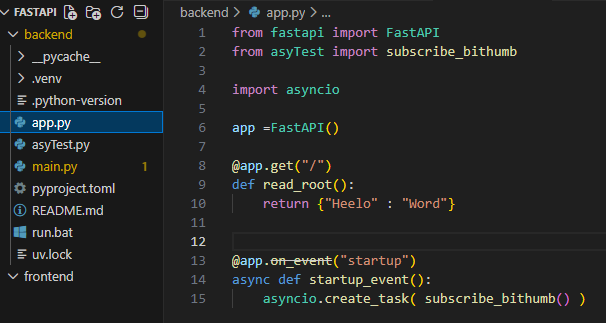

await을 안걸어주면 CPU 사용율이 100%가 된다. 반드시 걸어주자.
| 구분 | await 없음 | await 있음 |
| CPU 사용률 | 100% | 낮음 |
| 이벤트 루프 | 독점 | 공유 |
| 다른 작업 | 실행불가 | 실행 가능 |
| 서버 응답 | 멈춤 | 정상 |
app.py
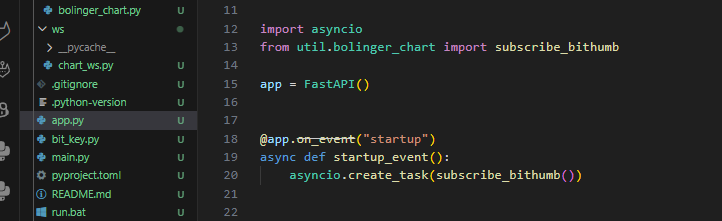
app.py에서 서버가 실행될 때, 나는 백그라운드에서 subscribe_bithumb( ) 함수를 지속적으로 계속 받아올 것이다.
bolinger_chart.py
# util/bolinger_chart.py
import websockets
import json
import math
import requests
from collections import deque
from parameter.param import param

paramKey = param()
MINUTES = paramKey["MINUTES"]
COUNT = paramKey["COUNT"]


MAX_CANDLES = 100
BB_PERIOD = 20

# 과거 + 실시간 분봉
CANDLES = deque(maxlen=MAX_CANDLES)
CURRENT_CANDLE = None


# 1️⃣ REST 캔들로 초기 분봉 세팅 (⭐ 핵심)
def load_initial_candles():
    url = f"https://api.bithumb.com/v1/candles/minutes/{MINUTES}?market=KRW-BTC&count={COUNT}"
    res = requests.get(url).json()

    # 오래된 → 최신
    res.sort(key=lambda x: x["candle_date_time_kst"])

    for c in res:
        ts = int(
            c["candle_date_time_kst"].replace("-", "").replace(":", "").replace("T", "")
        )

        CANDLES.append(
            {
                "timestamp": ts,
                "open": c["opening_price"],
                "high": c["high_price"],
                "low": c["low_price"],
                "close": c["trade_price"],
            }
        )


# 2️⃣ WS로 현재 분봉 생성 (JS와 동일)
def update_minute_candle(ts_ms: int, price: float):
    global CURRENT_CANDLE

    minute = ts_ms // 60000

    if CURRENT_CANDLE is None:
        CURRENT_CANDLE = {
            "minute": minute,
            "open": price,
            "high": price,
            "low": price,
            "close": price,
        }
        return

    if CURRENT_CANDLE["minute"] == minute:
        CURRENT_CANDLE["high"] = max(CURRENT_CANDLE["high"], price)
        CURRENT_CANDLE["low"] = min(CURRENT_CANDLE["low"], price)
        CURRENT_CANDLE["close"] = price
        return

    # 새 분 시작 → 이전 캔들 확정
    CANDLES.append(CURRENT_CANDLE)
    CURRENT_CANDLE = {
        "minute": minute,
        "open": price,
        "high": price,
        "low": price,
        "close": price,
    }


# 3️⃣ 분봉 기준 Bollinger (JS와 1:1)
def bollinger_from_candles(candles, n=20, k=2):
    if len(candles) < n:
        return None

    closes = [c["close"] for c in candles][-n:]
    mean = sum(closes) / n
    std = math.sqrt(sum((x - mean) ** 2 for x in closes) / n)

    return {
        "upper": mean + k * std,
        "middle": mean,
        "lower": mean - k * std,
    }


# 4️⃣ WebSocket 구독 (최종)
async def subscribe_bithumb():
    load_initial_candles()
    print(f"✅ 초기 분봉 {len(CANDLES)}개 로딩 완료")

    url = "wss://ws-api.bithumb.com/websocket/v1"

    async with websockets.connect(url) as ws:
        await ws.send(
            json.dumps(
                [
                    {"ticket": "proxy"},
                    {"type": "ticker", "codes": ["KRW-BTC"]},
                ]
            )
        )

        print("✅ Bithumb WebSocket 구독 완료")

        async for msg in ws:
            data = json.loads(msg)

            if data.get("type") != "ticker":
                continue

            price = float(data["trade_price"])
            ts = int(data["trade_timestamp"])

            update_minute_candle(ts, price)

            if len(CANDLES) >= BB_PERIOD:
                bands = bollinger_from_candles(CANDLES)
                print(
                    f"BB 상 {bands['upper']:.0f} | "
                    f"중 {bands['middle']:.0f} | "
                    f"하 {bands['lower']:.0f}"
                )
자바스크립트에서 했던 것처럼, 이번엔 파이썬으로 구현을 해야했다.
REST API로 과거분봉을 조회해왔고, 웹소켓 실시간 데이터를 붙이는 식으로 하며, 오래된 캔들은 제거되도록 하여 볼린저밴드를 완성시켰다.
CANDLES = deque(maxlen=MAX_CANDLES)
CURRENT_CANDLE = None
CANDLES
- 확정된 분봉만 들어가는 곳
- 분이 바뀌면 append됨
CURRENT_CANDLE
- 아직 진행 중인 분봉
- 실시간 체결로 high/low/close가 계속 변함
def load_initial_candles():WebSocket은 지금 이후 데이터만 보여주기 때문에, 볼린저 계산을 위해 과거 봉을 가지고 왔다.
res.sort(key=lambda x: x["candle_date_time_kst"])API 응답은 최신 → 과거 순이다. 그러나 계산 편의를 위해 과거 → 최신 순으로 정렬하기 위해 sort를 사용했다.
CANDLES.append({
    "timestamp": ts,
    "open": c["opening_price"],
    "high": c["high_price"],
    "low": c["low_price"],
    "close": c["trade_price"],
})
이 결과, CANDLES에 완성된 분봉만 쌓이게 된다. 이미 이 시점에서 BOLINGER 계산이 가능하다.
실시간 체결 → 분봉 생성
def update_minute_candle(ts_ms: int, price: float):체결 단위 데이터를 → 분봉 구조로 변환
🟢 최초 체결
if CURRENT_CANDLE is None:WS 처음 들어온 순간 새 분봉 시작.
🟡 같은 분일 때
if CURRENT_CANDLE["minute"] == minute:high / low / close만 갱신한다. open은 고정
🔴 분이 바뀌었을 때 (핵심 )
CANDLES.append(CURRENT_CANDLE)이전 분봉 확정, Bolinger 계산에 사용이 가능하다. 이 시점에 봉 마감한다.
coin_order.py
from fastapi import APIRouter
import jwt
import uuid
import hashlib
import time
from urllib.parse import urlencode
import requests
import json

from util.bolinger_chart import CANDLES, bollinger_from_candles

from bit_key import bitKey

router = APIRouter(
    prefix="/order",
    tags=["order"],
    responses={404: {"description": "Not found"}},
)

coinKey = bitKey()
# API 키
ACCESS_KEY = coinKey["ACCESS_KEY"]
SECRET_KEY = coinKey["SECRET_KEY"]
API_URL = "https://api.bithumb.com"


@router.get("")
def order():

    if len(CANDLES) < 20:
        return {"error": "분봉 데이터 부족"}

    bands = bollinger_from_candles(CANDLES)

    print("볼린저 데이터 -> ", bands)

    # Set API parameters
    requestBody = dict(
        market="KRW-BTC", side="bid", order_type="limit", price=84000000, volume=0.001
    )

    # Generate access token
    query = urlencode(requestBody).encode()
    hash = hashlib.sha512()
    hash.update(query)
    query_hash = hash.hexdigest()
    payload = {
        "access_key": ACCESS_KEY,
        "nonce": str(uuid.uuid4()),
        "timestamp": round(time.time() * 1000),
        "query_hash": query_hash,
        "query_hash_alg": "SHA512",
    }
    jwt_token = jwt.encode(payload, SECRET_KEY)
    authorization_token = "Bearer {}".format(jwt_token)
    headers = {"Authorization": authorization_token, "Content-Type": "application/json"}

    try:
        # Call API
        response = requests.post(
            API_URL + "/v2/orders", data=json.dumps(requestBody), headers=headers
        )
        # handle to success or fail
        print("order ->", response.status_code)
        print("order ->", response.json())
        return response.status_code
    except Exception as err:
        # handle exception
        print(err)
localhost:8000/order 에서 볼린저 밴드 값에 따른 코인 자동매매를 진행하려고 한다.

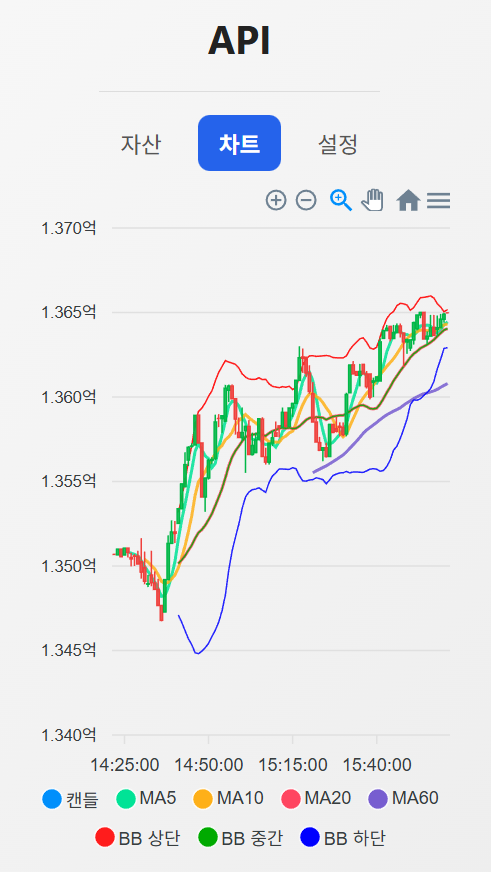
백그라운드에서부터 받아온 코인 값을 통해서 볼린저밴드 데이터를 만들었다.
해당 데이터를 통해서 비트코인 매수, 매도를 다음에 해보겠다.
볼린저밴드를 어떻게 구현할지에 대해서 정말 많은 고민을 했는데, FastAPI의 asyncio를 사용하면서 완벽하게 해결한 것 같다.
이처럼 asyncio는 CPU 연산보다 네트워크, 파일, 대기 시간 등이 긴 작업에 적합한 장점이 있다.
asyncio는 이벤트 루프 기반의 비동기 실행 모델을 제공하여, 대기 시간이 많은 작업을 효율적으로 처리할 수 있도록 한다.
'✨ python > FastAPI' 카테고리의 다른 글
| [FastAPI, Recat] 차트에 볼린저밴드 추가하기 (0) | 2026.01.04 |
|---|---|
| [FastAPI, React] 골든크로스, 데드크로스 ( Telegram Bot) (1) | 2025.12.21 |
| [FastAPI, React] Telegram Bot 연동하기 (0) | 2025.12.21 |
| [FastAPI, Recat] 이전 데이터 + 실시간 데이터(WebSocket) 합하기 (3) (0) | 2025.12.14 |
| [FastAPI, Recat] 이전 데이터 + 실시간 데이터(WebSocket) 합하기 (2) (0) | 2025.12.12 |

댓글