결과화면
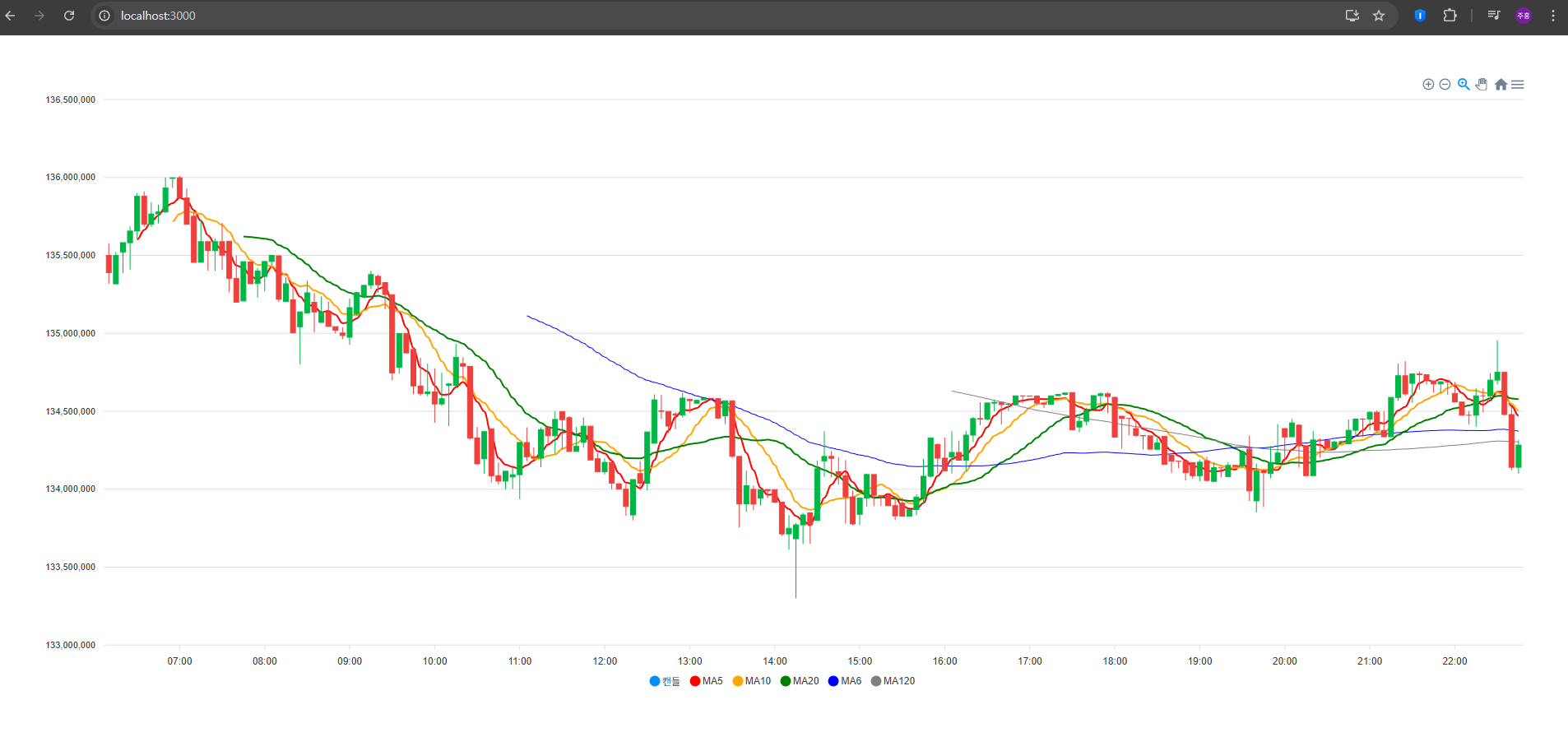
MA(이동평균)선을 5, 10, 20, 60, 120일 선을 다섯개 추가해주었다.
MaCalc.js
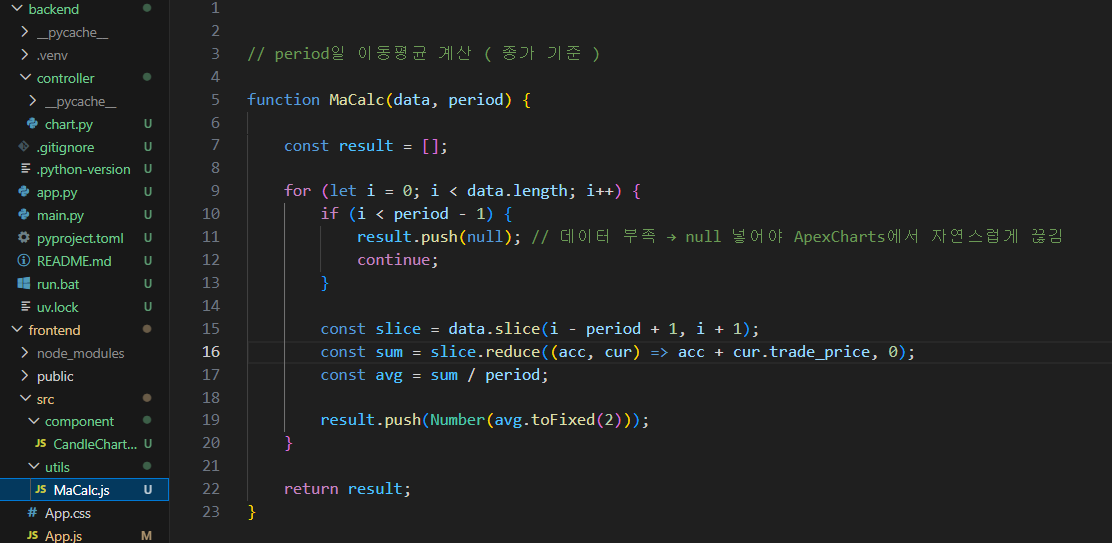
// period일 이동평균 계산 ( 종가 기준 )
export default function MaCalc(data, period) {

    const result = [];
    // 여기에 최종 MA 값들이 들어간다.
    // 길이는 data.length와 동일.

    for (let i = 0; i < data.length; i++) {
        if (i < period - 1) {
            result.push(null); // 데이터 부족 → null 넣어야 ApexCharts에서 자연스럽게 끊김
            continue;
        }
        // 예를 들어 MA5라면:
        // 0번 index → 데이터 1개 → 평균 불가
        // 1번 index → 2개 → 불가
        // 2번 index → 3개 → 불가
        // 3번 index → 4개 → 불가
        // 4번 index → 딱 5개 → 계산 가능
        // ApexCharts는 null 있으면 그래프가 자연스럽게 시작점에서 부드럽게 이어진다.

        const slice = data.slice(i - period + 1, i + 1);
        const sum = slice.reduce((acc, cur) => acc + cur.trade_price, 0);
        // slice 안에 포함된 trade_price(종가)들을 모두 더한다.
        // array.reduce((accumulator, currentValue) => ..., initialValue) 이 문법인데 줄여서 acc, cur로 한다 변수명 상관x
        const avg = sum / period;

        result.push(Number(avg.toFixed(2)));
        // toFixed : 소수점 자릿수를 나타내기 위해 사용
    }

    return result;

}
CandleCharts.js
import React, { useState, useEffect } from "react";
import Chart from "react-apexcharts";
import axios from "axios";

// MaCalc 이동평균 계산 함수 가져오기
import MaCalc from "../utils/MaCalc";


function CandleChart() {
    const [candle, setCandle] = useState([]);

    useEffect(() => {
        axios
            .get("http://localhost:8000/chart/candle")   // ← 직접 호출
            .then(res => setCandle(res.data))
            .catch(err => console.log(err));
    }, []);

    // 🔥 candle 데이터 로딩 전에는 렌더링 방지
    if (candle.length === 0) {
        return <div>Loading...</div>;
    }

	//정렬하기
    const sorted = [...candle].sort(
        (a, b) => new Date(a.candle_date_time_kst) - new Date(b.candle_date_time_kst)
    );
    //Upbit 등 API는 보통 최신 → 과거(내림차순)로 내려주기 때문에 차트는 시간순(오래된→최신) 으로 보여야 함.
    //그래서 sorted(오름차순)를 만들어 이후 모든 계산과 시리즈 생성에 반드시 사용해야 함.

    const seriesData = sorted.map(item => ({
        x: new Date(item.candle_date_time_kst),
        y: [
            item.opening_price,
            item.high_price,
            item.low_price,
            item.trade_price,
        ]
    }));
 	// ApexCharts의 캔들(ohlc) 형식: { x: timestamp, y: [open, high, low, close] }
	// candle_date_time_kst을 Date로 변환하여 x축에 사용.


    // 이동평균 계산 ( 종가 기준)
    const ma5 = MaCalc(sorted, 5);
    const ma10 = MaCalc(sorted, 10);
    const ma20 = MaCalc(sorted, 20);
    const ma60 = MaCalc(sorted, 60);
    const ma120 = MaCalc(sorted, 120);
    //MA는 sorted(오름차순)를 기준으로 계산해야 선이 캔들과 정확히 매칭됨 .
	//MaCalc는 앞의 (period-1)개는 null을 넣음(계산 불가), 이후 값은 숫자.

    // ApexCharts 시리즈 형태로 변환
    const ma5Series = ma5.map((v, i) => ({
        x: seriesData[i]?.x,
        y: v
    }));
    //MA값 배열을 {x,y} 형태로 바꿔서 ApexCharts 라인 시리즈로 사용함.
	//seriesData[i]?.x로 안전하게 x값(시간)을 매칭. (i가 존재하지 않으면 undefined 허용)

    const ma10Series = ma10.map((v, i) => ({
        x: seriesData[i]?.x,
        y: v
    }));

    const ma20Series = ma20.map((v, i) => ({
        x: seriesData[i]?.x,
        y: v
    }));

    const ma60Series = ma60.map((v, i) => ({
        x: seriesData[i]?.x,
        y: v
    }));

    const ma120Series = ma120.map((v, i) => ({
        x: seriesData[i]?.x,
        y: v
    }));

    const chartOptions = {
        chart: {
            type: "candlestick",
            height: 450,
            toolbar: { show: true },
        },
        stroke: {
            width: [1, 2, 2, 2], // 캔들 1px, MA 라인 2px
            curve: "smooth"
        },
        connectNullData: true,
        xaxis: {
            type: "datetime",
            labels: { datetimeUTC: false }
        },
        yaxis: {
            labels: {
                formatter: v => v?.toLocaleString("ko-KR") ?? ""
            }
        },
        tooltip: { shared: true },
    };
    //stroke.curve: "smooth" : MA 라인을 부드럽게(곡선) 그림.
	// connectNullData: true : MA 배열의 null값을 만나도 선을 자연스럽게 이어줌(없으면 앞부분 끊김처럼 보일 수 있음).
	// xaxis.datetimeUTC: false : 로컬(브라우저) 시간 사용 → 한국시간 PC면 KST로 보임.
	// yaxis.labels.formatter : 축 레이블 숫자 포맷(한국원형식). 안전하게 v가 null/undefined면 "" 반환.
	// tooltip.shared: true : 툴팁에 여러 series 데이터를 함께 보여줌.

    const series = [
        { name: "캔들", type: "candlestick", data: seriesData },
        { name: "MA5", type: "line", color: "red", data: ma5Series },
        { name: "MA10", type: "line", color: "orange", data: ma10Series },
        { name: "MA20", type: "line", color: "green", data: ma20Series },
        { name: "MA60", type: "line", color: "blue", data: ma60Series },
        { name: "MA120", type: "line", color: "gray", data: ma120Series },
    ];

    return (
        <Chart
            options={chartOptions}
            series={series}
            type="candlestick"
            height={750}
        />
    );
    // type="candlestick"을 지정했지만,
    // series에 type이 섞여 있으므로 ApexCharts가 캔들 + 라인 복합 차트로 렌더링함.
}

export default CandleChart;
참조 사이트
- https://www.apexcharts.com/docs/react-charts/?utm_source=chatgpt.com
React-ApexChart - A React Chart wrapper for ApexCharts.js
Create React Charts using a React Chart component for ApexCharts. Build beautiful and interactive visualizations in your react applications.
www.apexcharts.com
- https://www.apexcharts.com/?utm_source=chatgpt.com
ApexCharts.js - Open Source JavaScript Charts for your website
ApexCharts is a a free and open-source modern charting library that helps developers to create beautiful and interactive visualizations for web pages.
www.apexcharts.com
- https://www.apexcharts.com/docs/chart-types/candlestick/
Candlestick Chart Guide & Documentation – ApexCharts.js
Read this doc on how to create an interactive JavaScript Candlestick Chart. The guide contains examples and options for candlesticks.
www.apexcharts.com
- https://www.apexcharts.com/react-chart-demos/?utm_source=chatgpt.com
React Chart Examples & Samples Demo – ApexCharts.js
Explore all the examples and React samples created using the library. You can download these React Chart Examples and use them freely.
www.apexcharts.com
-
'✨ Front-end > 리액트(React)' 카테고리의 다른 글
| [React] ApexChart로 RSI 지수 데이터 그리기 (0) | 2026.01.19 |
|---|---|
| [React] Zustand와 FastAPI으로 분봉 상태 공유하기 (1) | 2026.01.18 |
| JSON데이터를 ApexCharts로 데이터 변환하여 캔들 형식 만들기 (0) | 2025.12.09 |
| [Spring-Boot , React] 스프링부트와 React 연동하기 (0) | 2023.09.26 |
| [React] 에러 react-scripts 은(는) 내부 또는 외부 명령 실행할 수 있는 프로그램 또는 배치 파일이 아닙니다. (0) | 2023.09.26 |


댓글